
Our verdict
This Total Adblock review explains why it is the ad blocker we rank first for people who want something they can install in a minute and then forget about. It blocks the usual banners, pop-ups and autoplay video ads, stops many third-party trackers, warns about malicious sites, and works across the main desktop browsers and on Android and iOS, all managed from one account. Independent testers consistently report near-perfect blocking scores. The trade-offs are real: the free tier is a cut-down version once the seven-day trial ends, the extension asks for broad browser permissions, renewal is automatic at a higher regular rate, and the company's privacy policy allows it to share some customer identifiers with advertising partners, which sits awkwardly with an ad blocker. For a beginner who wants a guided, paid product with support behind it, it is the easiest choice we know of. People comfortable configuring a free blocker may not need it.
This review is an editorial assessment based on Total Adblock's own website, pricing and privacy pages, its Chrome Web Store listing and the extension's published manifest, and the findings of independent review outlets. NerdBible did not run its own blocking tests; any test score quoted belongs to the outlet named.
What is Total Adblock and who is it for?
Total Adblock is made by the same company behind TotalAV. Its pricing page names Total Security US LLC of Boston, Massachusetts and Total Security Limited, and its Chrome Web Store listing gives the developer's address in Fareham in the UK. The privacy policy says these companies are part of Point Wild, formerly known as Pango. The product is sold on its own and is also included in TotalAV's Internet Security and Total Security plans.
It suits people who find ad-blocking settings confusing, who want the same blocker on a laptop and a phone, and who would rather pay for a product with a help centre than hunt through forums. It is less suited to technical users who want to write their own filter rules, to Firefox users, or to anyone who does not want to pay for ad blocking at all.
What does Total Adblock block?
According to the Total Adblock homepage and pricing page, the product is designed to:
- Remove ads: pop-ups, banners, flashing adverts and autoplay video ads.
- Stop tracking: third-party cookies, trackers and scripts that build a profile of you across sites.
- Warn about dangerous sites: deceptive ads and links that could lead to harmful or fraudulent pages.
- Silence notification prompts: the store listing mentions blocking intrusive browser notifications.
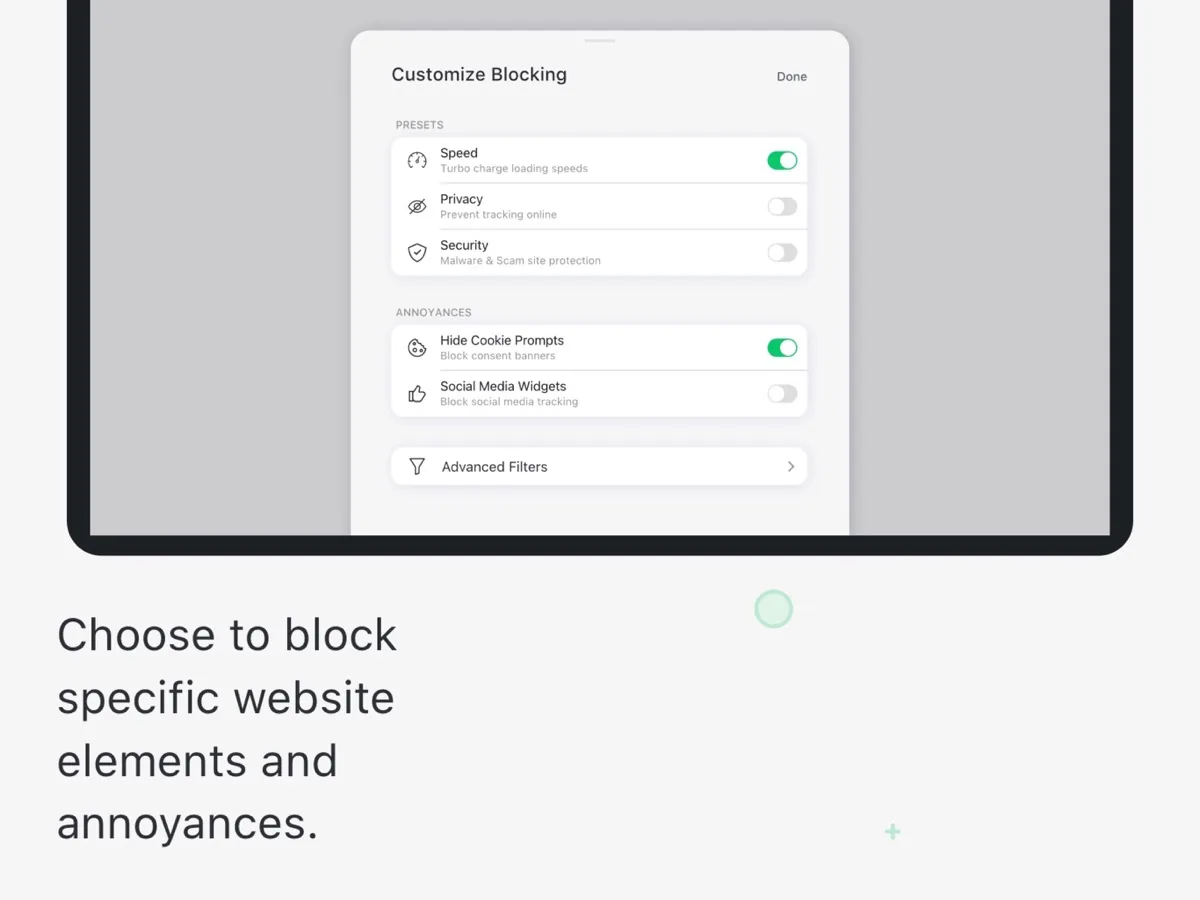
- Let you tailor blocking: presets aimed at speed, privacy or security, according to the store listing, and your own list of sites where you allow acceptable ads, a fair way to support sites you value.
Total Adblock is candid about limits in its small print: not all ads or tracking scripts may be blocked on every site, blocking varies by browser extension and device, and blocking on large social and video platforms may be limited depending on whether you use the website or the app. That last point matters. A browser extension cannot see inside a separate app, so ads inside native apps are largely outside its reach, and on iPhone the blocker works mainly in Safari.
Fewer ads and trackers usually mean lighter pages, and Total Adblock claims faster page loads and lower data use. Those are reasonable expectations for any blocker, but the size of the gain depends on the sites you visit.
Browsers and platforms
Total Adblock's footnotes say it works on most modern versions of Android and iOS and on the Chrome, Edge, Safari and Opera desktop browsers. Firefox is not on that list, and All About Cookies reports that the Firefox version has been withdrawn. All About Cookies also reports that the full Android app is downloaded from Total Adblock's own website, while the Google Play version works only within the Samsung Internet browser. On phones, Total Adblock notes that some platforms require you to enable content blockers or adjust settings during installation. There is no system-wide blocker for Windows or Mac: on a computer it is a browser extension.
On Chrome, the listing shows about 900,000 users and an average rating of 3.3 out of 5 from roughly 2,900 ratings. That is a middling rating for a top product, and the reviews are worth reading before you install.
Is Total Adblock safe?
Permissions
Every ad blocker needs wide access to the pages you visit, because it has to inspect and filter them. Total Adblock's Chrome extension is built on Manifest V3, Chrome's current extension platform. Its published manifest (version 5.13.0 at the time of writing) requests access to all sites and these permissions: declarativeNetRequest and webRequest (to filter network requests), webNavigation, tabs, scripting, cookies, browsingData, contentSettings, notifications, alarms, storage and unlimitedStorage.
Several of those are expected for a blocker. Some, such as browsingData (which allows clearing browsing data) and contentSettings (which can change site settings such as pop-up and notification permissions), are broader, though they line up with its cookie-clearing and notification-blocking features. Nothing in the listing suggests the extension is malicious; the point is that you are trusting its maker with a great deal of access, as you would with any blocker.
Privacy and data
The Chrome listing says Total Adblock collects your IP address at installation to allocate the free trial without asking for personal details, and that it does not store or log your data. The company-wide privacy policy is broader. It lists automatically collected information including browser type, IP address, pages visited on its services, device type and the time and date of visits, and it states that the company shares personal information for cross-context behavioural or targeted advertising, while not otherwise selling it. It also describes sharing hashed customer identifiers, such as an email address or phone number, with advertising partners so they can match audiences. US residents in states with privacy laws can opt out of that sharing, and the policy says it honours opt-out preference signals where legally required.
The policy covers all of the company's services together and does not spell out what the extension itself sends compared with the website and account. Anyone choosing an ad blocker mainly for privacy should read it and decide whether they are comfortable.
Is Total Adblock free?
Partly. According to the Chrome Web Store listing, you start with a seven-day free trial of the premium features, including unlimited blocking on all websites. After the trial you can keep using basic features for free or upgrade to keep full protection on popular sites. Several outlets explain what that means in practice: once the trial ends, the free tier stops blocking ads on the most visited websites, which are exactly the sites most people use. All About Cookies and PCrisk both report that the free version shows upgrade prompts, an odd experience in an ad blocker.
How much does Total Adblock cost?
Our price box shows current figures. The paid product is called Total Adblock Plus. The pricing page says Total Adblock offers monthly, quarterly, biannual and annual plans that renew automatically unless cancelled, that introductory pricing may be offered to first-time customers, and that renewals are billed at the standard rate unless otherwise stated. It promises notice at least 15 days before an annual renewal.
The money-back guarantee is 30 days for annual and biannual plans and 14 days for monthly, quarterly and add-on services. You must fully terminate the subscription to request a refund, since turning off auto-renewal alone does not end your access or trigger one, and an approved refund ends access immediately. Cancellation is done in the online portal under My Subscriptions. If you have other Total Security products on the same email, each subscription must be cancelled separately. And if you already pay for TotalAV Internet Security or Total Security, Total Adblock is included.
What could be better
- The free tier is a trial followed by a limited version that skips the busiest sites.
- Reviewers report upgrade prompts in the free version.
- Renewal is automatic and billed at the standard rate after any introductory term, and several outlets relay user complaints about cancelling.
- No Firefox extension, no system-wide blocker on computers, and ads inside native apps are largely out of reach.
- The privacy policy allows sharing hashed customer identifiers for targeted advertising.
- Its Chrome rating is only average.
Who should choose something else
If you are comfortable with a little setup, a free open-source blocker may be all you need. If you use Firefox, Total Adblock does not currently support it. If privacy matters more to you than convenience, a blocker whose maker does not share customer data for advertising may suit you better. If you want to block ads across every app on a computer, look at a system-wide or network-level blocker. And if you already have TotalAV Internet Security or Total Security, you have Total Adblock already.
Is Total Adblock worth it?
Total Adblock is the simplest way we know for a non-technical user to block most ads, pop-ups and trackers across Chrome, Edge, Safari, Opera and their phone, with presets, an allow list and support behind it. That ease of use, backed by consistently strong independent blocking scores, is why it leads our ranking. Before paying, understand that the free tier is limited after the trial, that renewal is automatic, that the extension needs broad permissions, and that the privacy policy permits some advertising data sharing. If those trade-offs are acceptable, it does the job with very little effort on your part.
What other reviewers found
- All About Cookies named it its top ad blocker after perfect scores on standard blocking tests, but flagged upgrade prompts in the free version, a steep renewal increase, user complaints about cancelling and the sharing of hashed identifiers with advertising partners.
- PCrisk found blocking highly effective and recorded top marks on two blocking tests, but called the free version a time-limited trial and noted reports that cancelling auto-renewal is harder than it should be.
- PrivacySavvy rated it 9 out of 10 and found it blocked common analytics tools, though one error-monitoring script got through; its support chat started with a bot before a person resolved the issue.
- AdBlock Tester recorded a perfect score across its 22 checks, while noting there is no Firefox add-on and no system-wide blocking on Windows or Mac.
Where the outlets agree: Total Adblock blocks ads and trackers about as well as any blocker on standard tests, it is very easy to set up, and the free version is really a trial. Where they differ is on how much the business model should count against it. Some score it top overall and treat renewal and upsells as footnotes; others give real weight to user complaints about billing and cancelling. For a buyer, the blocking quality is not the question. The deciding factors are whether you are happy to pay every year, whether you will remember the renewal date, and whether the advertising data sharing in the privacy policy is acceptable to you.
Frequently asked questions
Is Total Adblock legit?
Yes. Total Adblock is a real product from Total Security, the company behind TotalAV, which is part of Point Wild. Independent outlets report strong blocking results on standard tests. Most complaints concern billing rather than blocking: the free tier is limited after a seven-day trial, and paid plans renew automatically at the regular rate, so note your renewal date or switch off auto-renewal after buying.
Does Total Adblock work on Firefox?
Not currently. Total Adblock lists Chrome, Edge, Safari and Opera as its supported desktop browsers, plus most modern versions of Android and iOS, and independent reviewers report that the Firefox version has been withdrawn. If Firefox is your main browser, a blocker that supports it natively is the better choice. On a computer, Total Adblock works only inside the browser, not across other apps.
Is there a free version of Total Adblock?
There is a free tier, but it is limited. New users get a seven-day trial with full blocking on every site. After that, the free version keeps basic blocking but, according to several reviewers, no longer blocks ads on the most popular websites, and it shows prompts to upgrade. Full blocking needs a paid Total Adblock Plus plan or a TotalAV plan that includes it.
How do I cancel Total Adblock?
Log in to the online portal and switch off auto-renewal under My Subscriptions; you keep access until the paid term ends. For a refund, you must fully terminate the subscription within 30 days of starting an annual or biannual plan, or 14 days for monthly and quarterly plans, and access then ends immediately. Other Total Security products on the same email must be cancelled separately.
Does Total Adblock collect my data?
The Chrome listing says the extension collects your IP address to set up the free trial and does not store or log your data. The company-wide privacy policy is broader: it describes collecting usage and device information on its services and sharing hashed customer identifiers with advertising partners for targeted advertising. US residents in states with privacy laws can opt out. Read the policy if privacy is your main reason for using a blocker.