
Help Scout review: our verdict
This Help Scout review covers one of the best-liked help desks for small and growing support teams. Help Scout started as a shared inbox that makes support email feel like a personal reply rather than a ticket number, and it has kept that character while adding live chat, messaging apps, a knowledge base and, more recently, a set of AI tools: an autonomous agent called Compass, an in-inbox assistant called Copilot, and an insights layer called Signal. There is a free plan for up to five users, and the AI agent comes with a three-month free trial.
Help Scout is our pick for small teams in the AI customer support category. It is not the most powerful help desk you can buy, and its AI agent is charged per resolution on top of seat-based plans. But if your support runs mainly on email, your team is between a handful and a few dozen people, and you care about customers receiving warm, human replies, Help Scout is one of the safest choices available.
NerdBible did not run its own hands-on trial for this review. It is an editorial assessment based on Help Scout's own pricing, product and security pages and on the published findings of independent review outlets and user-review platforms, credited and linked throughout.
What is Help Scout and who is it for?
Help Scout is a cloud help desk built around four products. According to the Help Scout homepage, Inbox brings email, chat, social messages, SMS and voice into one shared workspace; Agent (Compass) answers customers directly; Copilot helps human agents work faster; and Signal turns conversations into reporting and trends. The company says more than 12,000 businesses use it.
It suits:
- Email-first support teams that want a tidy shared inbox with assignment, collision detection and saved replies, without the weight of a full contact-centre suite.
- Small software and ecommerce companies that want a help centre (called Docs) and a website widget (called Beacon) in the same product.
- Teams starting with AI cautiously, who want drafts and summaries for their agents first and an autonomous agent only where it proves itself.
It is less suited to large, multi-department contact centres, and to teams whose main channel is the phone.
Key features
Shared inbox
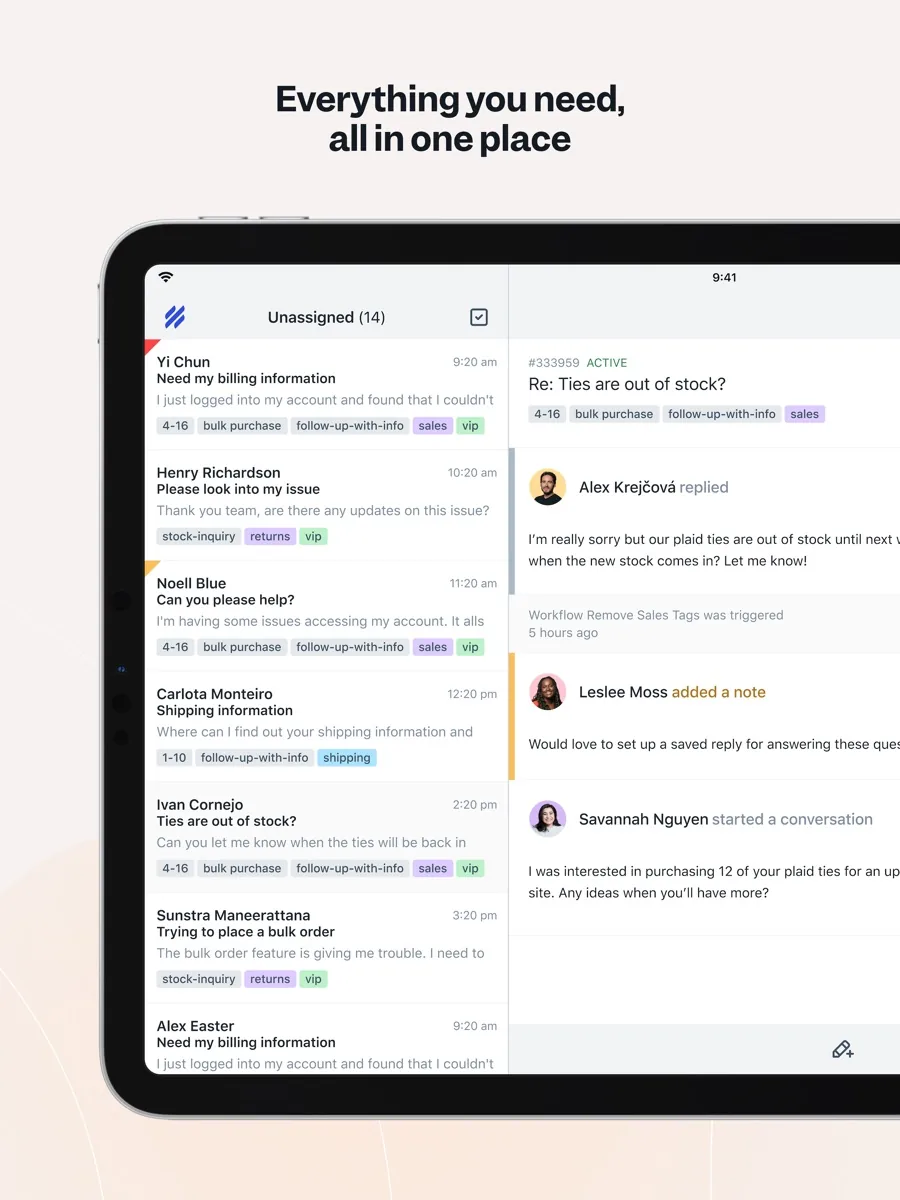
The inbox is the heart of the product and the feature reviewers praise most. Conversations look like email threads, teammates can be assigned automatically, notes stay internal, and collision detection shows when someone else is already replying. Saved replies, tags, folders, snooze, send-later and workflows keep the queue organised. Help Scout has recently added service level agreement (SLA) tracking, and the pricing page shows one basic SLA policy on the Standard plan, two advanced policies on Plus and unlimited policies on Pro.
Channels
The Help Scout pricing page lists email and live chat as core channels, with WhatsApp, Instagram and Facebook Messenger included from the Standard plan. SMS and phone calls are handled through integrations rather than natively, so a team that needs a built-in phone system will want to check the partner options.
Docs and Beacon
Docs is Help Scout's knowledge base and help centre. Beacon is an embeddable widget that lets visitors search help articles, start a chat or send a message from any page of your website or app, and can suggest different articles depending on the page a visitor is on.
Compass, the AI agent
The Help Scout Agent page describes Compass as an AI engine that learns from your help centre, websites and other sources you connect, follows the guardrails and no-go topics you set, and escalates to your team with full context when it should not answer. Help Scout says each response passes dozens of internal checks and that Compass resolves 73 percent of requests on average; that is the vendor's own figure. Help Scout also states that it never trains AI on your data. Compass can work in chat, inside your app and on incoming email. Learning from past conversations is listed as coming soon.
Copilot and AI drafts
The Help Scout Copilot page describes AI drafts generated from similar past conversations and your help content, plus summaries, tone adjustment and translation. Note the plan split: basic AI writing help (expand, shorten, edit, translate) is on every plan, but unlimited AI drafts and summaries start on the Plus plan.
Signal and reporting
The Signal page covers topic grouping, trends, response and resolution times and satisfaction tracking. Reporting history is limited on the lower plans: the pricing page shows a short history window on Free and a two-year window on Standard, with all-time history on Plus and Pro.
How much does Help Scout cost?
We do not quote prices; our price box shows the figures we hold. The structure is:
- Free: up to five users, one inbox and one Docs site, with a monthly cap on the number of contacts you help.
- Standard, Plus and Pro: priced per user per month, with annual billing discounted. Each step raises user, inbox and workflow limits and adds features such as advanced SLAs, round-robin routing and Salesforce, Jira and HubSpot integrations on Plus, and unlimited workflows, multiple routing types and a dedicated onboarding specialist on Pro (which has a minimum number of users).
- AI Answers (Compass): an add-on billed per resolution on every plan, with a three-month free trial, prepaid discounts and the option to set a monthly cap. A resolution only counts if the customer does not escalate, search further or ask for more help.
- Extras: additional inboxes and Docs sites, and HIPAA, single sign-on and IP restrictions on higher plans or as add-ons.
Is Help Scout secure?
The Help Scout security page says the service is hosted on Amazon Web Services, holds a SOC 2 Type 2 report for security and availability, and undergoes periodic white-box penetration tests by an independent firm, with summaries available on request. Help Scout also says it maintains HIPAA compliance and will sign a Business Associate Agreement with customers who need it; HIPAA support is an add-on on the pricing page. On the AI side, the company states that customer data is not used to train AI models.
What could be better
- Reporting depth. Custom reporting and long history sit on the higher plans, and reporting is the most common complaint in user reviews.
- Automation limits. Workflows are capped on Standard and Plus, and complex routing needs the Pro plan.
- AI costs are separate. The AI agent is billed per resolution on top of seat fees, so a busy queue needs its own budget line.
- Phone and SMS through partners. Voice and text messaging rely on integrations rather than a built-in system.
- Fewer integrations than the giants. Help Scout lists more than a hundred apps, which covers most small-business tools but is far from Zendesk's marketplace.
Who should choose something else?
If you want an AI agent on your website within the hour and most of your contact comes through chat, Tidio is quicker to deploy. If you run a large or complex operation with phone queues, many brands and strict SLAs, Zendesk or Freshdesk will scale further. If your support is built around order history and repeat contacts in a high-volume store, a timeline-based platform such as Kustomer may suit you better. And if two or three people answer a modest amount of email, Help Scout's free plan, or even a well-organised shared mailbox, may be enough.
What other reviewers found
- Zapier named Help Scout its pick for team collaboration, praising assignment by team and mailbox, collision detection, light users and private knowledge collections, but found the feature set minimal next to rivals and felt a recent update to the Docs editor was a step back.
- In a separate guide to Zendesk alternatives, Zapier recommended Help Scout to teams that want a simple, affordable help desk without the bloat and a smaller learning curve than Zendesk.
- The CX Lead highlighted the clean interface, fast onboarding and the Beacon widget, and recommended it for small and midsize teams that value a human touch, while noting that its automation and analytics are not the deepest available.
- Reviewers on Software Advice rate it highly for ease of use and for Help Scout's own customer support, but repeatedly describe reporting as basic and workflow customisation as limited.
Where the reviewers agree, and where they differ
There is near-total agreement on Help Scout's strengths: an inbox that new agents learn in a day, strong collaboration features, and a company that answers its own customers well. There is equal agreement on the trade-off: depth. Every source, from Zapier's editors to everyday users, says reporting and automation are thinner than in the big suites.
Where they differ is on whether that matters. Zapier and The CX Lead treat simplicity as the whole point and recommend Help Scout precisely to teams escaping a heavier tool. Some user reviewers, by contrast, feel the lighter feature set leaves them wanting more as they grow. Most of the outside reviews also focus on the inbox and say less about Compass and Signal, which are newer. The buyer's takeaway: if your team is small to mid-sized and email-heavy, the limits are unlikely to bite; trial Compass on real conversations during the free AI period before you rely on it, and check the reporting on the plan you can afford.
Is Help Scout worth it?
For small and growing teams, yes. Help Scout combines an inbox people enjoy using, a capable help centre and a measured approach to AI, with a free plan to start on and clear security credentials. It is less suited to large contact centres or teams that need built-in phone support and heavy analytics, but within its sweet spot it is hard to beat.
Frequently asked questions
Does Help Scout have a free plan?
Yes. Help Scout's Free plan covers up to five users with one shared inbox and one Docs knowledge base site, with a monthly limit on the number of customers you help. It suits very small teams starting out. Paid plans add more users and inboxes, social channels, SLAs, AI drafts, more workflows and longer reporting history, and they can be trialled before you pay.
What is Help Scout's AI agent?
Help Scout's AI agent is called Compass, sold on the pricing page as AI Answers. It answers customer questions in chat, inside your app and on email using your help centre and other sources you connect, follows topics you allow or block, and hands conversations to your team with context when needed. It is billed per resolution and includes a three-month free trial.
Is Help Scout HIPAA compliant?
Help Scout says it maintains HIPAA compliance and can store protected health information for customers who sign a Business Associate Agreement with it. On the pricing page, HIPAA support appears as an add-on. It also holds a SOC 2 Type 2 report. Healthcare organisations should confirm the exact plan and add-on they need with Help Scout before going live.
Does Help Scout support phone calls?
Not natively. Help Scout's pricing page lists phone calls and SMS as available through integrations with telephony partners, with calls logged in the Help Scout inbox. Email, live chat, WhatsApp, Instagram and Facebook Messenger are built in. Teams whose support runs mainly over the phone may prefer a help desk with its own voice system.
Is Help Scout better than Zendesk?
It depends on your team. Help Scout is simpler, quicker to learn and has a free plan, which suits small and mid-sized teams that work mainly by email. Zendesk offers far more channels, routing options, reporting and marketplace apps, which suits larger and more complex operations. Independent reviewers consistently describe Help Scout as the lighter, friendlier choice.
Sources
- Pricing, Help Scout
- Help Scout homepage, Help Scout
- AI Agent (Compass), Help Scout
- Copilot, Help Scout
- Signal, Help Scout
- Security, Help Scout
- The best customer service software and customer support tools, Zapier
- The best Zendesk alternatives, Zapier
- Help Scout Review: Pros, Cons, Features, and Pricing, The CX Lead
- Help Scout Reviews, Software Advice